
Exercise: Create a DocBook File and Associate it with the Balisage schema
- In Oxygen, go to File / New… / Framework templates / DocBook / DocBook 5.1 and create a new Article file. (While you are there, look at the other DocBook templates that are available to you.)
- Save the file to your documents in a folder named Lastname_ENGL406_contentModelling. Name the file Lastname_ENGL406_contentModelling_article.xml
- Now go to the Balisage webpage at https://www.balisage.net/tagset.html and download the RNG file.
- You’ll have to unzip (“Extract”) the downloaded file. Save balisage-1-5.rng to the same folder as the XML file you just made.
- In Oxygen, go to Document / Associate schema … .
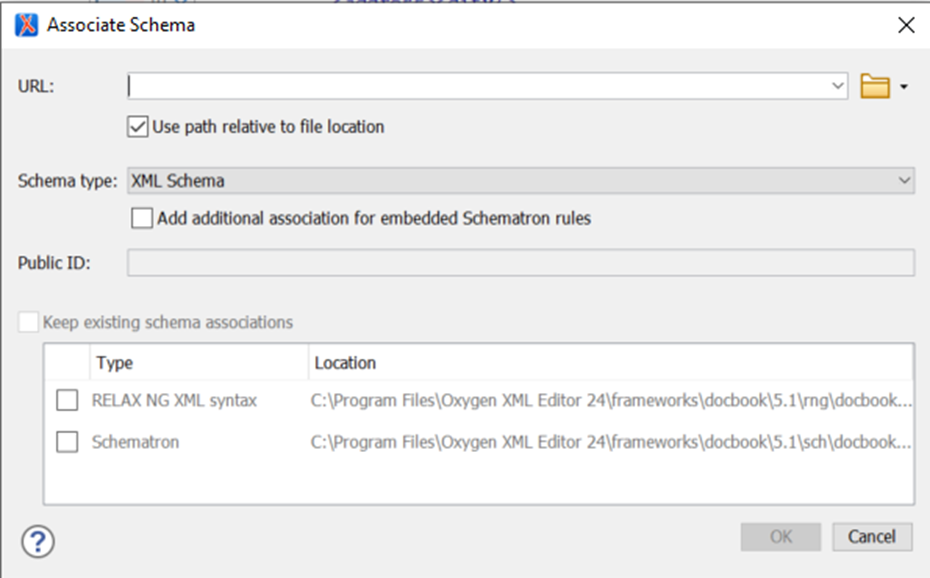
In the URL: field, use the arrow to browse to the RNG file you just saved. Make sure that “Use path relative to file location” is checked.
6. Have a look at your XML file now. It should have the new schema associated with it.
 Janelle Jenstad